



A stereo and immersive mix tool for Neumann headphones
Review by Paul Vunk Jr.
In 2019, Neumann released the NDH 20 closed-back studio headphone (reviewed September 2019). This was followed in 2022 by the open-back NDH 30 (reviewed November 2022). Now, three years later, the Berlin-based company introduces RIME, a stereo and immersive monitoring plugin designed exclusively for use with the NDH 20 and NDH 30.
RIME and Reason
RIME (Reference Immersive Monitoring Environment) is a VST3, AU and AAX plugin for macOS and Windows. It is designed to deliver what Neumann describes as a “reference-quality immersive monitoring” experience on headphones. RIME supports stereo, 5.1, 7.0, 7.1, 7.0.4, 7.1.2 and 7.1.4 formats—5.1 and 7.1.2 were added in the recent 1.5 update.
Like other plugins of this type, the goal of RIME is to place the listener inside a virtual studio environment, simulating the aural experience of listening to monitors in a real acoustic space.
Reviews
- October 2026: Chandler Limited REDD Mixing System
- September 2026: Barefoot Sound Footprint 01 Gen 02 and Footprint 02 Gen 02
- iamReverb
- August 2026: Focusrite ISA C8X
- July 2026: JZ Microphones MU-1
- Fender Quantum LT 16 USB-C Audio Interface
- LANDR: An all-in-one music ecosystem
- June 2026: Strymon NightSky Experimental Reverb Plugin
- May 2026: Sennheiser HD 480 PRO
- Neumann Rime
All in the Family
Unlike many virtual monitoring plugins on the market, RIME does not offer a choice of multiple monitor types, famous studios or acoustic spaces.
Instead, RIME presents a purpose-built studio environment configured with a 7.1.4 Dolby Atmos array of Neumann
KH-series monitors. The system was room-corrected using the company‘s MA 1 Automatic Monitor Alignment microphone and software. The room model was then captured with the famous KU 100 binaural microphone head through a Neumann MT 48 audio interface.
RIME also employs Sennheiser AMBEO 3D audio technology, which was developed to enhance spatial realism and depth in soundbar, stereo, and headphone-based monitoring environments.
Let’s Meet RIME
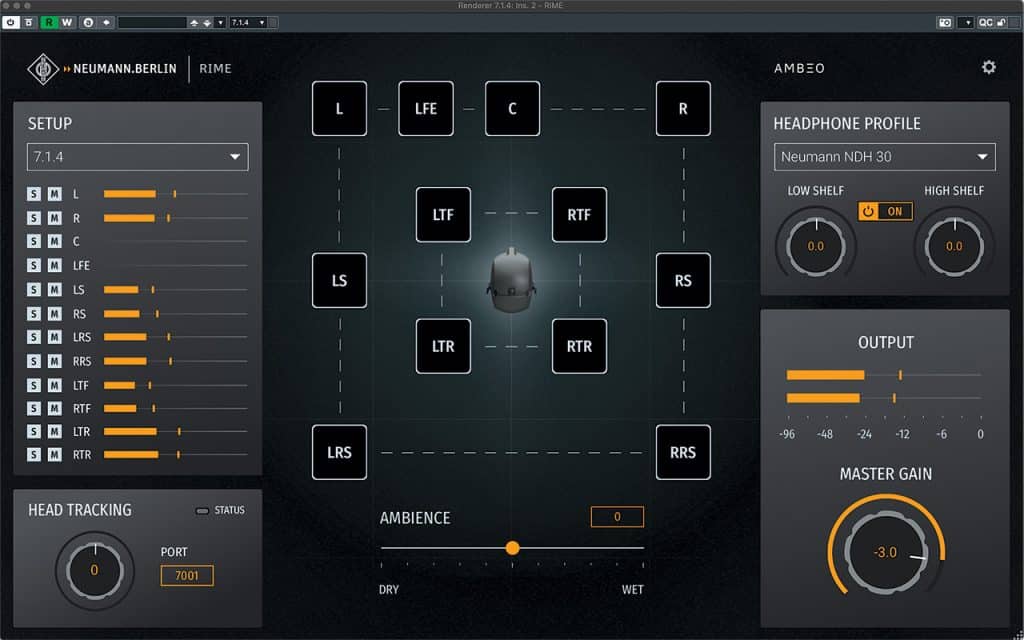
The user interface is presented in a single-window layout that can display either a graph-style speaker and channel view or a skeuomorphic representation of the monitors within the virtual room.
On the left side of the screen, you can select the appropriate speaker configuration and monitor each channel‘s output level. This section also allows solo and mute control for individual speakers, which can likewise be activated by clicking directly on each speaker icon in the main graph view.
Below this are controls for manual and automatic head-tracking when using supported third-party head-tracking devices. In the upper right of the plugin is the Headphone Profile section, where you select between the NDH 20 or NDH 30 headphones, along with a pair of fixed low and high shelving EQs that provide a touch of tonal personalization.
At the bottom of the interface is the master output level control, paired with a stereo (technically binaural) level meter.
The final control is the Wet/Dry Ambience slider, which adjusts the amount of room sound in the mix. This effect is very subtle—so much so that I was not always sure I could perceive a notable difference.
Settings
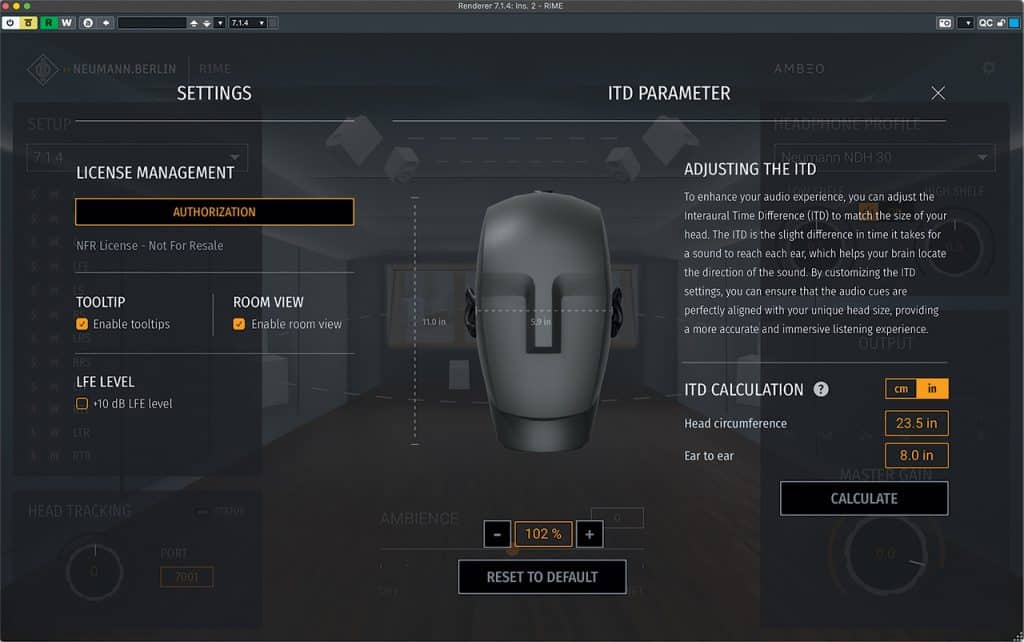
Opening the Settings window lets you authorize RIME, enable tooltips, toggle between Room or Graphic view, and apply a +10dB LFE boost.
More important is a trio of options for ITD (interaural time difference). Here you enter ear-to-ear distance and overall head circumference, then click Calculate so RIME can adjust internal parameters for more accurate stereo and immersive localization cues. Do not skip this step, and do not guess.
Ready for RIME-Time
RIME runs at the end of your DAW’s internal monitoring chain, fed by a discrete stereo or immersive Atmos mix (after the Dolby Atmos Renderer)—note that it will not operate if fed an Atmos binaural render.
There are no decisions to make regarding speaker choice or listening environment. While some users accustomed to a wide array of options might view this as a limitation, it is actually one of this plugin‘s greatest strengths. You simply feed your mix into RIME, and it allows you to monitor and mix in both stereo and Atmos within a top-
tier virtual Neumann KH-equipped studio.
Into the Binaural World
I auditioned several 7.1.4 Atmos mixes alongside Audiomovers Binaural Renderer for Apple Music, the stock Dolby Binaural Renderer, and APL Virtuoso software. For stereo use, I compared RIME with the Steven Slate Audio VSX system. I also had the opportunity to hear RIME firsthand at Neumann headquarters in Berlin a few weeks ago, listening to some famous commercially released Atmos tracks.
It is difficult to make a direct comparison between RIME and Virtuoso or VSX, since both of those products offer multiple virtual environments and a deeper level of user customization. I will say that in stereo, RIME is more controlled and subtle than many of the VSX studio options.
Likewise, comparing RIME to the Dolby and Audiomovers Apple renderers is not entirely fair, since—unlike those processes—RIME is more than just a binaural renderer. Rather, it is a binaural representation of sound reproduced through speakers within an acoustic space.
Sonically, RIME easily holds its own among all of these tools, and the choice ultimately comes down to taste and workflow.
Ain’t that Spatial
Comparisons aside, RIME sounds impressive and delivers some of the best localization I have heard in a binaural mix—noticeably more convincing than the standard binaural renderer options. Sound sources from the height, side and especially rear speakers genuinely feel as though they are positioned above, around and behind the listener. If I were grading RIME, it would earn an A+ for localization and spatialization. Yet, it never sounds over the top or gimmicky.
Further Observations
A key thing to keep in mind about RIME is that it functions as a mixing and listening tool. It is an excellent way to craft an immersive mix when a discrete Dolby Atmos setup is not available, and it even allows engineers to mix convincingly—and enjoyably—in Atmos (and stereo) while on the go. It is not, however, a replacement for a discrete speaker array. Since it is neither an encodable nor renderable process, it cannot substitute for the crafting, checking and rendering a final binaural downmix. Neumann clarifies that while you can render the results, a listener would need to have a pair of NDH 20 or NDH 30 headphones for it to sound correct.
Of course, one important reminder is that RIME works only with Neumann headphones. Fortunately, I own both models. The NDH 20 is my primary final-mix checking headphone in the studio, and I have enjoyed evaluating stereo mixes through the NDH 20 in RIME (with about 2dB of low-shelf boost).
For 7.1.4 monitoring, I much prefer the soundstage of the open-back NDH 30 headphones. Again, the depth and overall binaural illusion are among the most convincing I have heard.
Wrap Up
Bottom line: if you own a pair of Neumann NDH-series headphones, RIME is a no-brainer—especially if you are looking for a stellar tool for crafting and checking Atmos mixes on headphones. Even if you work strictly in stereo, RIME makes an excellent mix-checking companion, offering a fresh perspective when paired with your NDH headphones.
Price: $99.95 More From: neumann.com