Audio Interface Considerations
By Paul Vnuk Jr.
Welcome to part four of my journey into immersive audio and Dolby Atmos.
In part one (March 2025), we looked at the conversion of my basement office/editing suite into an Atmos listening and mixing space. In part two (May 2025), I discussed my monitor choice: an immersive bundle of IK Multimedia iLoud MTM MKII monitors (reviewed in February 2025), along with a JBL\LSR310S subwoofer for low-frequency extension (LFE).
In part three, I walked through the nitty-gritty details of cables, power, and speaker mounting options and placement considerations after consulting the Excel-based Dolby Atmos Room Design Tool (DARDT).
You can check out all three previous installments for free online at: recordingmag.com/resources/recording-info/immersive-audio
In this fourth installment, it’s time to look at audio interfaces for an Atmos setup.
The Ins and Outs of Dolby Atmos
Dolby Atmos (or Atmos) is currently the dominant immersive audio format. While often thought of as an evolutionary step from 5.1 and 7.1 surround sound, it differs significantly from previous speaker-based surround, stereo and quad formats.
Atmos and immersive audio are object-based rather than “channel-based,” where an audio track is assigned to a speaker. Being object-based allows immersive mixes to scale to both larger and smaller speaker setups, ranging from large-scale theaters down to stereo, 5.1, and even binaural headphone listening.
The minimum speaker configuration for mixing in Dolby Atmos is 7.1.4, which equates to seven surround speakers, one low-frequency extension speaker (a subwoofer, but not acting as a boom-boom box (see Will Kennedy’s “Know Your Lows,” June 2024), and four height speakers. 9.1.4 and 9.1.6 are also common standard Atmos mixing configurations.
This equates to a minimum of 12 speakers required for a basic Atmos setup.
I chose an immersive bundle of 11 matched IK Multimedia iLoud MTM MKII monitors and added a JBL\LSR310S subwoofer. This decision was based not only on this model’s excellent, physics-defying sound, but just as crucially, the model’s compact size.
When it came to choosing an Atmos interface, I quickly learned there were many factors to consider.
The Inputs and Outputs of a Dolby Atmos Interface
To accommodate a 7.1.4 configuration, one needs an interface with 12 outputs. Since most audio interfaces typically come in configurations of 2, 4, 8 or 16 channels, with an equal number of inputs and outputs, the most obvious starting point is a 16×16 channel option.
From a functional standpoint, any 16-channel interface should work, right? The assumed answer is yes. The practical answer is sort of.
Regarding Atmos, you also need to consider factors such as volume control, corrective room EQ and time delay (essentially to ensure the sound of the speakers around you arrives at your ears simultaneously and phase aligned).
Channel Count Practicalities
First, some questions: Are you planning to mix strictly in Atmos, or will you also be mixing in stereo? Will you be using the left (L) and right (R) Atmos speakers for both tasks, or do you have a different dedicated set of stereo monitors? Are you focused only on mixing music, or are you also recording?
Suppose the answer to all of the above is yes. In that case, a 16-channel interface will cover your bases nicely—plenty for tracking, plenty for immersive mixing and even four remaining outputs for an extra pair or two of stereo monitors.
If you only plan on mixing, then on a practical level, a 16×16 channel interface is a waste of input channels.
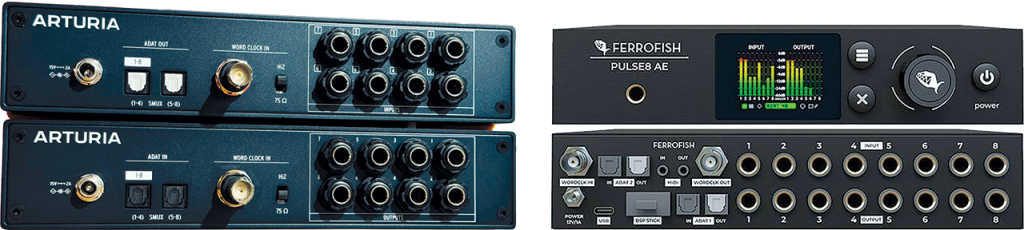
A modular and expandable option could be to start with a four or eight-channel interface equipped with an ADAT optical output, and add an ADAT expansion box. Three that come instantly to mind are the Ferrofish Pulse8 AE 8×8 AD/DA converter, the Solid State Logic Alpha 8 and the Arturia AudioFuse X8 OUT. Each unit can add eight extra outputs to a modest 4×4 audio interface, providing the exact channel count required for a base Atmos setup.
Of course, with Ferrofish and SSL, you still get a full complement of eight inputs and eight outputs, while the eight-output-only Arturia unit could be a perfect fit for those in a mix-only Atmos scenario.
Another practical consideration is that you need to be aware of what kind of outputs an interface offers. Most audio interfaces provide 1/4” balanced outputs, or in the case of many 8- and 16-channel models, the outputs are on D-Sub (DB25) connectors. It’s uncommon to find XLR-based outputs beyond an occasional stereo pair.
Most studio monitors use either XLR, 1/4” TRS, or sometimes both. It will be up to you to select the appropriate cabling to go from your interface to your monitors. Refer back to part three, where I delve into greater depth on the subject of outputs, cable considerations and your speakers.
Turn It Up, Turn It Down
Now, just because an audio interface offers the correct number of outputs needed for Atmos, a simple, yet vital question is, “How am I going to change the volume level simultaneously for 12 speakers?” Some interfaces can, and many cannot.
In the stereo realm, many studios often employ an external monitor control for both speaker and source selection, as well as the simple task of volume control.
This has also long been true for most traditional surround setups. Companies such as Dangerous Music, SPL, Crane Song, Grace Designs, Audient, DAD and Trinnov manufacture external monitor controllers for 5.1 and even some 7.1 setups. In the world of immersive audio, the options get narrower.
Today, the primary immersive monitor controller options include the Trinnov MC Processor, SPL MC16, Grace Design m908 and multiple offerings from DAD.
The benefit of this solution is that you can choose to use the interface or a high-end D-to-A converter of your choice. The potential downside is cost, as this is a decidedly “upper-end” solution.
There are also a few multi-channel audio interfaces capable of immersive monitoring and level control when paired with a dedicated remote control.
In this category, you will find options such as the Antelope Audio MRC (Multichannel Remote Controller) connected to one of the company’s current Galaxy
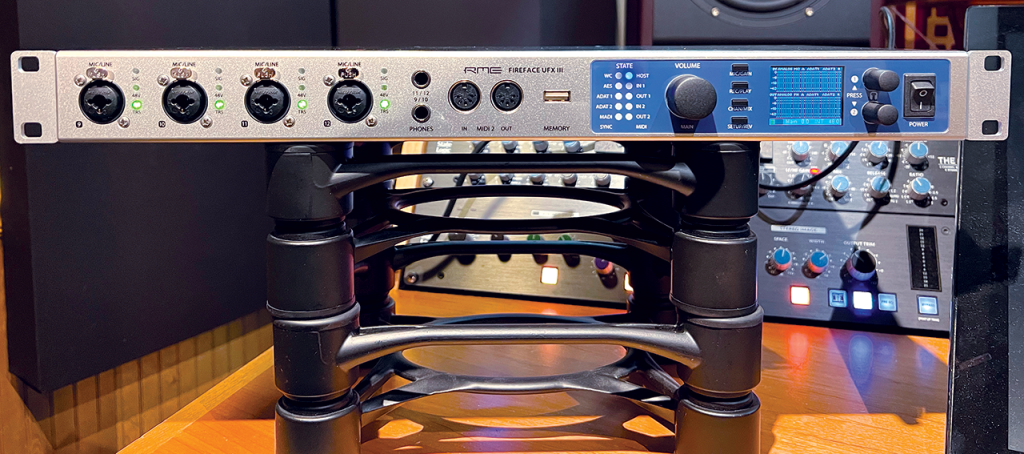
or Orion Synergy Core units. Any Atmos-capable RME interface can be adjusted with the company’s RME ARC USB remote, and Apogee offers a similar solution with the Apogee\Control hardware remote.
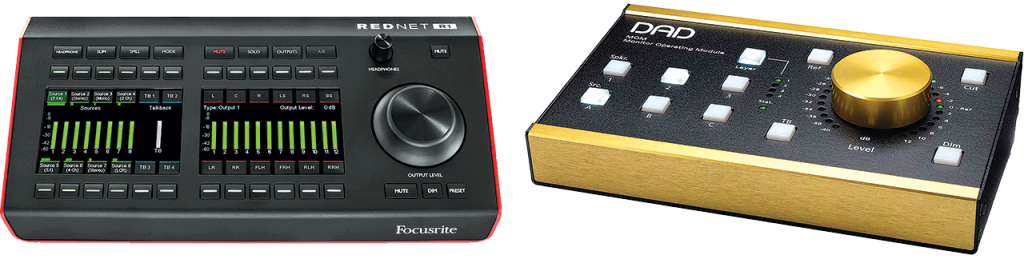
It’s also worth noting that some companies, such as Avid, allow their interfaces to be remotely controlled by the popular DAD MOM.
For those fluent in the Dante Protocol, there is the Focusrite Red 16Line interface paired with the Focusrite RedNet R1 desktop remote controller. In these scenarios, you have an audio interface, paired with a dedicated, proprietary remote control box.
Some companies, such as Merging Technologies, allow you to use a smaller desktop-style interface, in this case, the Merging Anibus interface in monitor control mode, to control the I/O on the multi-channel Merging Hapi audio interface. Universal Audio (UA) also offers a similar solution, by pairing an Apollo x4 or Apollo Twin X as a controller paired with an Apollo x16.
In a variation on this theme, Genelec fans can choose any of the company’s Smart Active Monitoring (SAM) equipped speakers, controlled by the Genelec 9320A SAM Reference Controller. The company also manufactures the 9301B AES/EBU multichannel interface and the 9401A, a multichannel audio-over-IP solution.

Take a Stand
For rear surround speakers, I chose to mount them on a pair of straight, round base mic stands from On Stage. While best known for super-affordable mic stands in the $20 to $30 range, On Stage also offers a range of ultra-robust upper-end options.
Case in point, I selected the MS9212 ($75). This stand has a 12″ diameter, 10 lbs low-profile base that is only 0.25″ high. The MS9212 can extend up to 65″ with a super-thick 1.125″ stand tube. As far as straight stands go, the MS9212 is next level.
Mounting the iLoud offerings on a mic stand requires the use of a Euro 3/8” male to USA 5/8” female mic screw adapter. In this case, I chose two black On Stage MA100B adaptors ($4.95 each).
This setup does a great job of keeping the 5.5 lbs. iLoud MTM MKII monitors firmly in place with only the slightest controlled momentary wobble if bumped. To ensure they can be returned to the proper position and angle if moved, I plan on marking each base and the concrete floor with three small alignment marks.
For my LCR speakers, which live on the upper shelf of my Wavebone Headquarter studio desk, for now I will be using the included IK stands for the left and right speakers and horizontal mounting pad for the center speaker, although I may consider a pair of mini-desktop mic stands in the future.
Atmos Onboard
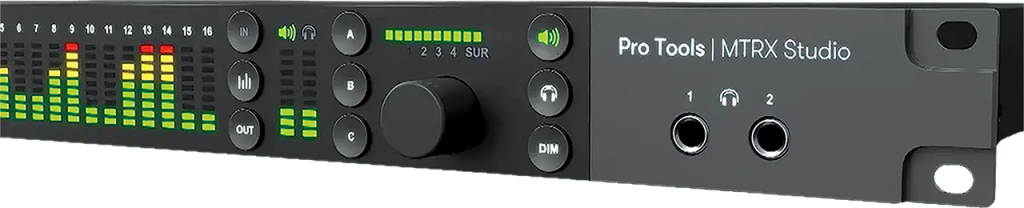
Reigning this back into the world of audio interfaces capable of Atmos monitoring/level control, current popular options include the HDX-based Avid MTRX Studio. In addition to its new Symphony Studio line, which we will discuss shortly, the flagship Symphony I/O MKII from Apogee was made fully Atmos monitoring-capable last year via a firmware update.
Similarly, Lynx Studio Technology also released a firmware update for its Aurora (n) series, offering full Atmos capability. RME was one of the first to offer Atmos speaker management and control for its DSP-equipped UFX III, UFX II, UCX II and 802 FS interfaces.
UA added Atmos speaker control when it released the Apollo x16 Gen 2\interface. Notably, UA has made this option backward compatible with the first-generation Apollo x16. Finally, Arturia has included immersive audio support in its flagship AudioFuse 16Rig.
As mentioned, Antelope Audio and Merging Technologies both offer Atmos-capable interfaces. This also includes the Neumann MT48, which is a sister unit to the Merging Anubis.
One caveat with some offerings from RME, Neumann and Merging is that although these interfaces are fully Atmos-capable, not all natively provide 12 to 16 physical outputs. They require an expansion unit via ADAT or networked audio, which each company offers. Note that Merging and Neumann are sister companies under the Sennheiser umbrella, and similarly, RME and Ferrofish are both part of the Synthax family.
There may be a company or interface I have not mentioned, but the takeaway here is that, despite this impressive collection of Atmos-capable interfaces, it remains a relatively small and specialized club compared to the dozens of “regular” interface options on the market. Also note that most of the interfaces (and even controllers like the Grace, DAD, and Trinnov) also offer immersive EQ and delay-based room correction options. However, there are still some, like the Focusrite Red and Arturia AudioFuse 16Rig, for instance, that only offer monitor control as of this writing.
Room Correction
Speaker management is an integral component of an Atmos system—which in this case refers to the ability to EQ and time-correct each speaker individually within the system, most often via that unit’s internal DSP mixing software.
The next consideration is whether you need to make your measurements with a program such as Room EQ Wizard (REW) or via an automated room correction process like the widely popular Sound ID Reference from Sonarworks.
Then, can you load those directly into the interface, or must you enter them manually— parameter by parameter, speaker by speaker?
As of now, UA, AVID, Audient, RME, Lynx and Merging all offer direct SoundID integration.
Trinnov utilizes its own cutting-edge room correction microphone and process in conjunction with its interfaces and controllers.
Genelec and IK Multimedia both offer speaker-based correction stored in each monitor via a proprietary process. Genelec utilizes SAM and a GLM kit; IK Multimedia employs its ARC system.
Similarly, some monitor manufacturers, such as Wayne Jones Audio, ADAM Audio and Fluid Audio, each offer speaker-by-speaker Sonarworks SoundID integration. Please note that DAD and Grace Design controllers also offer SoundID integration, and, of course, Sonarworks can run independently on your computer for multichannel correction.
Atmos-Specific Interfaces
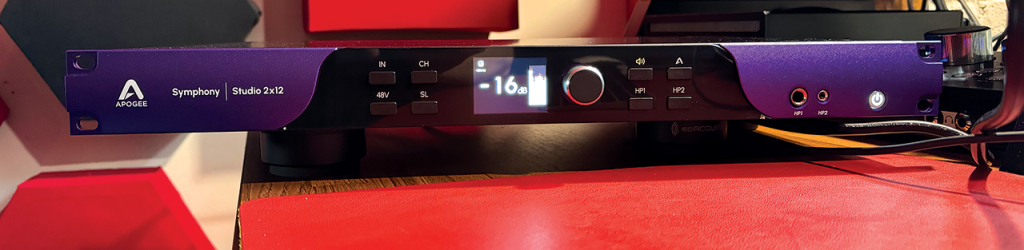
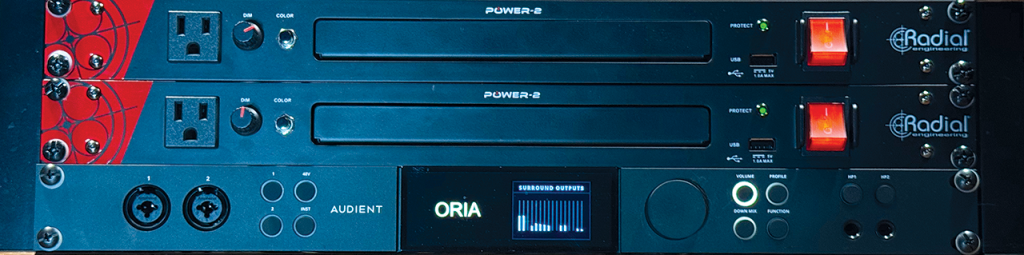
Finally, we come to two audio interfaces that, thus far, are the only Atmos-specific interfaces on the market: the Audient ORIA and the Apogee Symphony Studio 2×12 audio interface. I have mentioned both units in previous installments of this column, and both were reviewed in the June 2025 issue.
What do I mean by an Atmos-specific audio interface?
Beyond monitor control and speaker correction, all of the previously mentioned options are still basic, broad-use audio interfaces. The two units here are Atmos first, foremost and in many ways, only.
Each unit offers only two audio inputs—handy for simple tracking and the occasional overdub, and necessary for room correction microphones. From there, the Apogee Symphony Studio 2×12 offers 12 outputs dedicated to a 7.1.4 speaker setup, as well as switchable stereo monitoring via the L and R channels, and a pair of headphone outputs. All of this uses full-scale Symphony I/O MK II (non-SE) conversion quality and sound, coupled with rock-solid, plug and play use. It’s also worth noting that Apogee has partnered with IK Multimedia to offer a pair of turnkey immersive audio packages.
The Audient ORIA is a 2×20 audio interface (plus two additional headphone outs). It offers dedicated outputs for both 7.1.4 and 9.1.6. You also get two dedicated sets of stereo monitor outs.
I recommend referring to my review of each unit in our June 2025 Atmos issue, but please note that each unit’s feature set is 100% Atmos-forward in scope and execution. The ORIA even lets you store and switch between multiple SoundID profiles, and offers complete app-based remote control as well as full Stream Deck integration—which I use all the time.
Wrap Up
I am impressed and pleased to see so many interface choices, with so many companies getting on board the Atmos train. What you choose will come down to your needs, brand preferences, feature set, and, of course, price.
I have chosen to stick with the Audient ORIA as its integrated Atmos feature set is stunning and yet simple to grasp and use.
Next time we will dig into room correction with a walkthrough of both the IK Multimedia ARC and Sonarworks processes in my room and the results of each.
See you then.
For Your Studio